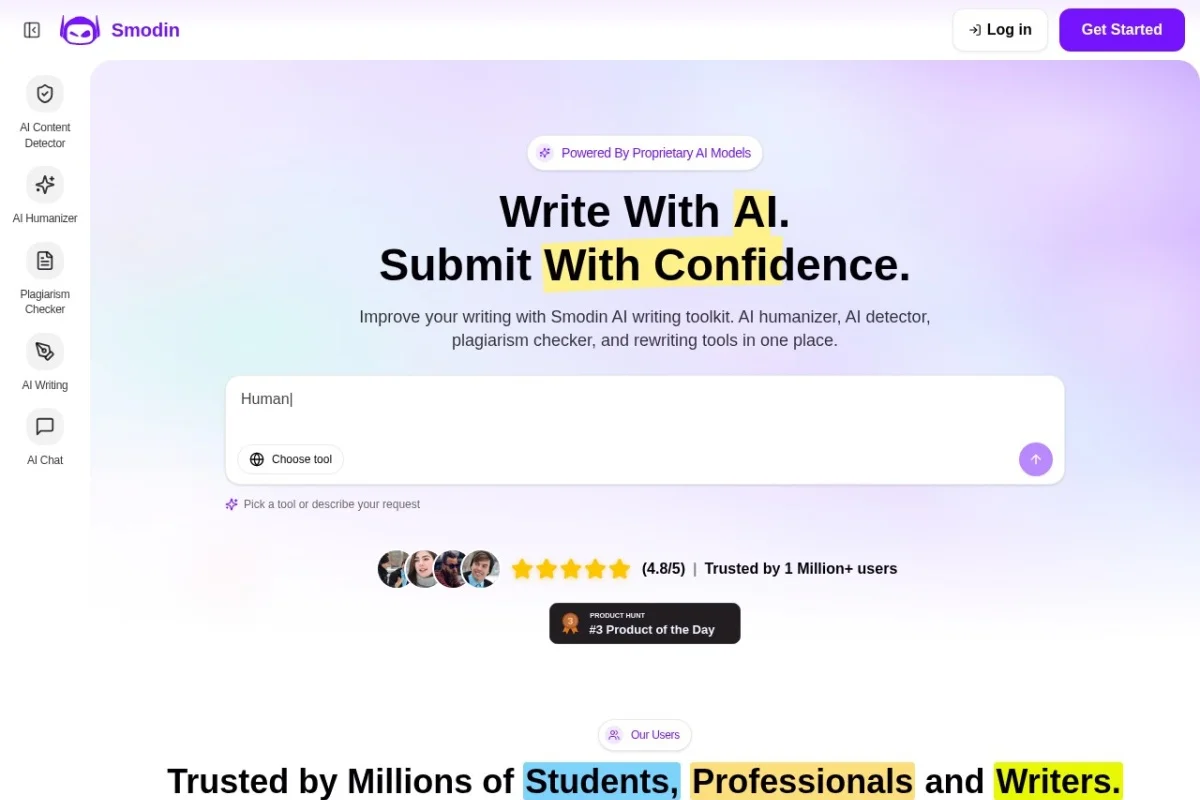
Mastering Content Authenticity: A Complete Guide to Smodin AI Content Detector
In today’s digital landscape, the line between human and AI-generated text is increasingly blurred. Whether you’re a student submitting an essay, a teacher reviewing assignments, a content manager overseeing a blog, or a marketer crafting emails, knowing the origin of your text is crucial. This is where the Smodin AI Content Detector becomes an indispensable tool. It is a sophisticated, web-based application designed to analyze text and determine the likelihood that it was created by an artificial intelligence model such as ChatGPT, GPT-4, or Google’s Gemini. Beyond just detection, it offers a powerful solution to refine AI-generated content, making it sound more natural and human. This detailed tutorial will guide you through every aspect of the tool, from your first visit to advanced usage tips, empowering you to ensure the authenticity and quality of any written content.
Introduction: Why AI Detection and Humanization Matter
The rise of powerful, accessible AI writing assistants has created a dual challenge. On one hand, there is a growing need to identify AI-generated text to maintain academic integrity, ensure content originality for SEO, and preserve authentic human voice in communication. On the other hand, many users legitimately employ AI as a brainstorming or drafting tool but need the final output to pass as human-written to avoid penalties from search engines, academic institutions, or discerning readers. Smodin’s tool elegantly addresses both sides of this coin. It acts first as a forensic scanner, providing a confidence score on whether text is AI-born, and second as a transformative engine, helping you “humanize” content by altering sentence structure, word choice, and flow to evade other detectors. This combination makes it a unique and powerful asset in any writer’s toolkit.
Getting Started with Smodin AI Content Detector
Beginning your journey with the Smodin AI Content Detector is straightforward and requires no technical expertise. Follow these simple steps to get up and running.
Accessing the Tool
First, open your preferred web browser and navigate to the official Smodin website at https://smodin.io/. The homepage showcases Smodin’s suite of tools. Look for the navigation menu or a direct link to the “AI Content Detector” or “AI Detector” tool. You can often find it under sections like “Tools,” “Products,” or “Solutions.” Click on it to be taken directly to the detector’s interface.
Understanding the Interface
Upon landing on the AI Content Detector page, you will be greeted by a clean, user-friendly interface. The central element is a large, empty text box or text area where you will paste or type the content you wish to analyze. Above or below this box, you will typically find clear options or buttons labeled “Detect AI” or “Check for AI.” You may also see a separate tab or section prominently labeled “Humanize” or “AI to Human,” which is the gateway to the content transformation feature. The design is intuitive, placing the core functionality front and center for immediate use.
Account Considerations
Smodin allows users to perform a certain number of checks for free, which is perfect for beginners or occasional use. For high-volume needs or access to advanced features like bulk processing or higher word limits, you may need to create a free account or explore their subscription plans. Account creation usually involves providing an email address and setting a password. Having an account also allows you to track your detection history and seamlessly integrate with other Smodin writing tools.
Key Features of Smodin AI Content Detector
This tool is packed with features designed to give you comprehensive control over content analysis and refinement. Let’s break down its core capabilities.
Multi-Model AI Detection
The detector is not limited to identifying text from just one AI model. It is trained to recognize patterns and signatures from a wide array of popular language models, including:
- OpenAI’s suite: ChatGPT (GPT-3.5 and GPT-4 variants)
- Future-proofing: It is prepared for models like GPT-5.
- Google’s AI: Text from Gemini (formerly Bard).
- And others: It continually updates to detect output from other major AI writing tools.
This broad-spectrum detection ensures its relevance and accuracy as the AI landscape evolves.
Confidence Score and Detailed Reporting
After analysis, the tool doesn’t just give a simple “yes” or “no.” It provides a nuanced confidence score, often presented as a percentage (e.g., 98% AI-generated) or a label (e.g., “Highly Likely AI”). This score reflects the algorithm’s certainty based on linguistic patterns like predictability, sentence uniformity, and certain grammatical quirks common to AI. Some reports may even highlight specific sentences or paragraphs flagged as most likely machine-written, giving you actionable insights.
AI to Human Text Converter (Humanizer)
This is a standout feature. If your text is detected as AI or simply sounds too robotic, you can use the “Humanize” function. With a click, the tool rewrites the provided text. It does this by:
- Introducing more varied sentence lengths and structures.
- Swapping out overly common AI phrases with more idiomatic language.
- Adding subtle imperfections or transitional phrases that mimic human thought flow.
- Altering the word choice to be less predictable.
The goal is to produce text that retains the original meaning and quality but bypasses AI detection systems.
Multi-Language Support
Content creation is a global endeavor. Smodin’s detector supports analysis in multiple languages, making it valuable for non-English speakers, international students, and global businesses. You can check the authenticity of text in Spanish, French, German, and many other languages, though the highest accuracy is often noted for English.
Integration with Smodin Ecosystem
The AI Content Detector is not an isolated tool. It works in concert with other Smodin offerings, such as:
- Smodin Author: An AI writing assistant.
- Plagiarism Checker: To ensure both originality and human authorship.
- Research Tools: For citation and source finding.
This integration allows for a seamless workflow from research and drafting to detection and humanization, all within a connected platform.
How to Use the Tool: A Step-by-Step Walkthrough
Now, let’s put the tool into action with a practical, step-by-step guide for both primary functions: detection and humanization.
Step 1: Preparing Your Text
Gather the text you want to analyze. This could be an essay paragraph, a blog post draft, a product description, or even an email. Copy the text to your clipboard. For best results, ensure the text is at least 50-100 words long. Very short snippets can be difficult for any detector to analyze accurately.
Step 2: Performing an AI Detection Check
- Navigate to the Smodin AI Content Detector page.
- Paste your copied text into the main text box.
- Click the button labeled “Detect AI”, “Check for AI,” or similar.
- Wait a few seconds for the tool to process your text. The analysis is typically very fast.
Step 3: Interpreting the Results
Once the analysis is complete, the results will be displayed clearly. You will see the confidence score. For example:
- 0-20% Human: The text is very likely written by a human.
- 80-100% AI: The text is highly likely generated by an AI.
- Mixed Results (e.g., 60% AI): This indicates a hybrid text, possibly human-edited AI content or AI-assisted human writing.
Read any additional notes or highlighted sections provided to understand which parts triggered the AI detection.
Step 4: Humanizing AI-Generated Text
If your text scores high for AI content and you wish to make it undetectable:
- Look for the “Humanize” or “AI to Human” tab/button. This might be next to your detection results.
- If you just ran a detection, there is often a “Humanize This Text” button directly on the results page. Click it.
- The tool will generate a new, rewritten version of your text.
- Important: Always review the humanized text carefully. While it aims to be fluent, you should check for preserved meaning, factual accuracy, and overall flow. Edit as you would any draft.
Step 5: The Verification Loop
For critical projects, employ a verification loop:
- Run the original AI draft through the detector (confirm it’s flagged).
- Humanize the text using Smodin.
- Copy the newly humanized text and run it back through the Smodin detector (or even a different detector for a second opinion).
- The new result should show a significantly higher “Human” score. If not, you may need to do additional manual editing or try humanizing again, as the output can vary.
Pro Tips for Effective Use
To become a power user and get the most reliable outcomes from Smodin AI Content Detector, keep these expert tips in mind.
For Accurate Detection
- Use Adequate Text Length: Always submit chunks of 150-200 words or more for a more reliable analysis. Single sentences are not sufficient.
- Context is Key: Be aware that highly formal, technical, or formulaic writing (like legal disclaimers or scientific methodology sections) can sometimes trigger false positives for AI, as both AI and human writing in these styles are very structured.
- It’s a Tool, Not a Judge: Use the confidence score as a strong indicator, not an absolute verdict. Combine its results with your own judgment of the writing style and knowledge of the content’s origin.
For Optimal Humanization
- Edit After Humanizing: Treat the humanized output as an excellent first draft. Infuse it with your unique voice, specific domain knowledge, and personal anecdotes that an AI could never replicate.
- Break Up Large Documents: If you have a very long article, humanize it section by section (e.g., paragraph by paragraph) for more consistent and manageable results.
- Combine with Manual Techniques: Use the humanized text as a base, then manually add rhetorical questions, colloquialisms, or slight digressions to make it feel even more authentically human.
Strategic and Ethical Use
- Transparency is Best: In many professional and academic settings, it is ethical and often required to disclose the use of AI assistance. Use the detector to check your work, not to deceive where honesty is mandated.
- SEO and Content Marketing: Use the tool to audit your website content. Search engines may demote content they perceive as low-value AI spam. Humanizing can help maintain SEO performance while leveraging AI efficiency.
- Quality Control: Use the detector as a final quality check before publishing any content that you or your team has produced, ensuring it meets your standards for originality and human touch.
The Smodin AI Content Detector is more than just a simple checker; it’s a comprehensive platform for navigating the new era of AI-assisted writing. By understanding its features, mastering its workflow, and applying strategic tips, you can harness the power of AI while maintaining the invaluable qualities of human authenticity and originality. Whether your goal is to detect, transform, or simply understand the nature of a text, this tool provides the clarity and control you need in a rapidly evolving digital world.

Smodin AI Content Detector
Accurate AI checker for detecting text from ChatGPT, GPT-5, and Gemini.