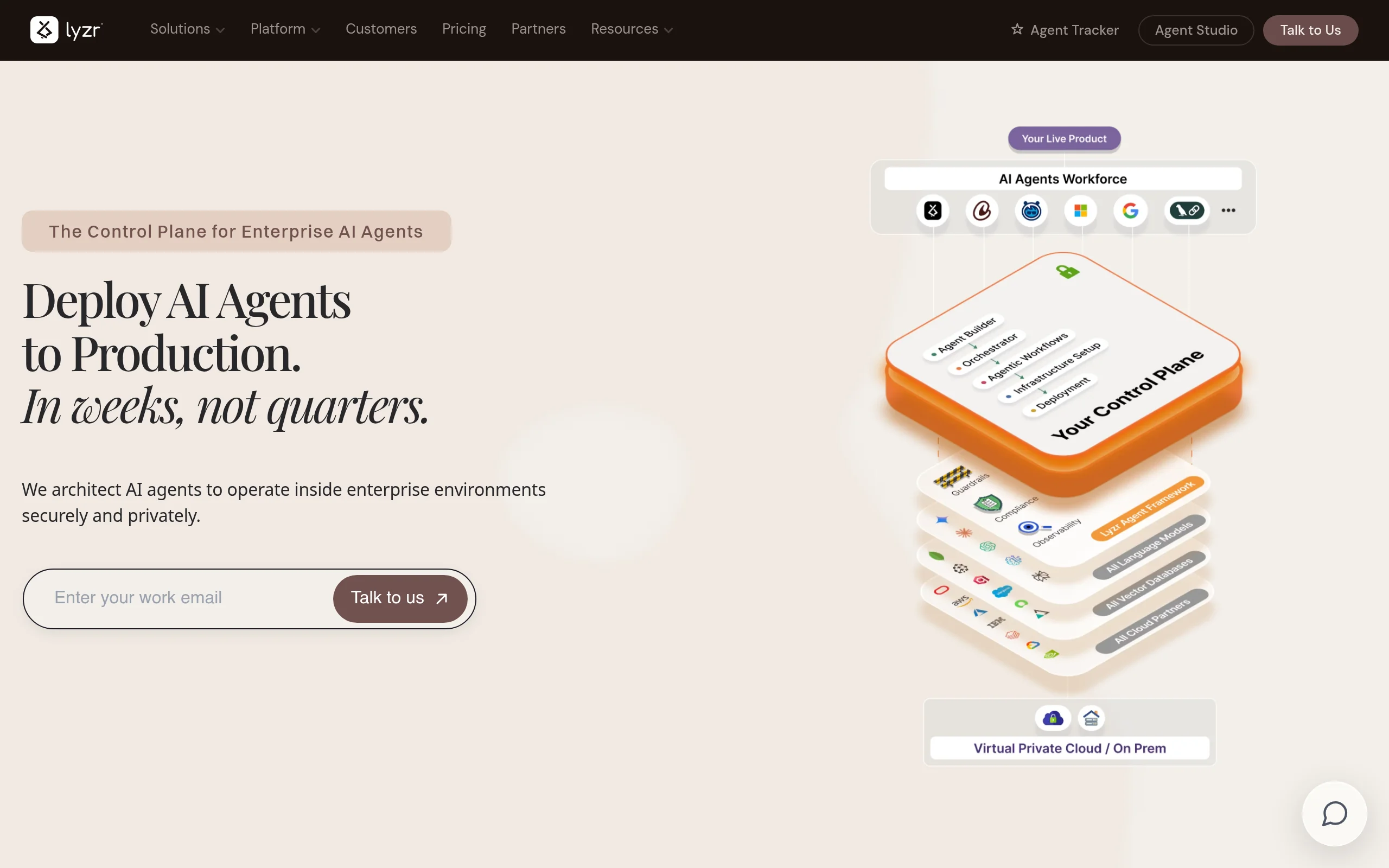
Introduction to Lyzr AI Agent Platform
Artificial Intelligence agents are transforming how businesses automate tasks, handle customer interactions, and process data. However, building and deploying these agents traditionally requires months of development work, specialized machine learning expertise, and complex infrastructure management. Lyzr AI Agent Platform solves this problem by providing a complete ecosystem for rapidly building, testing, and launching autonomous AI agents into production environments.
Lyzr stands out as a comprehensive solution that bridges the gap between AI experimentation and real-world business implementation. Whether you are a seasoned developer looking to accelerate deployment or a business professional with no coding background, Lyzr offers tools that adapt to your skill level. The platform reduces typical development timelines from months to weeks, allowing organizations to realize the benefits of AI automation much faster.
This tutorial will guide you through everything you need to know about Lyzr, from understanding its core capabilities to building your first production-ready AI agent. By the end, you will have a solid foundation for leveraging this platform to automate workflows, integrate with your existing systems, and deploy agents that can operate autonomously in your business environment.
Getting Started with Lyzr
Understanding the Platform Architecture
Before diving into hands-on usage, it is important to understand how Lyzr structures its services. The platform operates on a cloud-based infrastructure that handles the heavy lifting of AI model management, scaling, and orchestration. This means you do not need to worry about server provisioning, model hosting, or performance optimization. Lyzr takes care of these technical complexities so you can focus on building functional agents.
The platform consists of several interconnected layers:
- Agent Builder Layer: This is where you define your agent’s behavior, knowledge base, and capabilities. It supports both visual no-code tools and API-based development for advanced users.
- Orchestration Engine: This component manages how agents process tasks, handle multiple requests simultaneously, and coordinate with other agents or systems.
- Integration Hub: A collection of pre-built connectors and APIs that allow your agents to interact with external tools, databases, and software platforms.
- Deployment Pipeline: Automated processes that take your agent from development to production with minimal manual intervention.
- Monitoring and Analytics: Dashboards and logs that provide visibility into agent performance, usage patterns, and error rates.
Creating Your Account
To begin using Lyzr, navigate to https://lyzr.ai/ and click on the “Get Started” or “Sign Up” button. You will be prompted to create an account using your email address or through single sign-on options if available. After verifying your email, you will gain access to the Lyzr dashboard, which serves as your central command center for all agent-building activities.
Once logged in, take a few minutes to explore the dashboard layout. You will find sections for creating new agents, managing existing deployments, viewing analytics, and accessing documentation. The interface is designed with clarity in mind, so even first-time users can navigate without confusion.
Key Features of Lyzr AI Agent Platform
Rapid AI Agent Deployment
The most significant advantage Lyzr offers is speed. Traditional AI agent development involves selecting a model, training or fine-tuning it, building an application layer, testing extensively, and then deploying to a server. Lyzr collapses these steps into a streamlined workflow. You can define an agent’s purpose, configure its parameters, and push it to production within hours instead of months.
This rapid deployment capability is possible because Lyzr provides pre-optimized AI models, automated testing environments, and one-click deployment pipelines. The platform handles version control, rollback procedures, and scaling configurations automatically, removing the most time-consuming aspects of AI deployment.
Production-Ready Infrastructure
Many AI development platforms work well in controlled environments but fail when exposed to real-world traffic and data. Lyzr is built from the ground up for production use. This means your agents benefit from:
- High availability: The platform runs on distributed infrastructure that remains operational even if individual components fail.
- Security compliance: Data encryption, access controls, and audit logging are built into the platform by default.
- Performance optimization: Agents are automatically tuned to balance response speed with accuracy based on your specific use case.
- Error handling: Robust fallback mechanisms ensure that if an agent encounters an unexpected input, it responds gracefully rather than crashing.
Scalable Agent Orchestration
As your business grows, your AI agents need to handle increasing workloads without degradation in performance. Lyzr’s orchestration engine automatically scales agent instances up or down based on demand. If you launch a marketing campaign that drives thousands of customer inquiries, the platform will spin up additional agent instances to handle the load. When traffic subsides, it scales back down to save resources.
This orchestration also supports complex workflows where multiple agents collaborate. For example, you could have one agent handling customer inquiries, another processing order data, and a third generating reports. Lyzr manages the communication and task handoffs between these agents seamlessly.
Integration with Existing Systems
An AI agent is only as valuable as its ability to interact with your existing business tools. Lyzr includes a comprehensive integration hub that connects with popular platforms such as:
- Customer relationship management systems like Salesforce and HubSpot
- Communication tools including Slack, Microsoft Teams, and email servers
- Database systems such as MySQL, PostgreSQL, and MongoDB
- Enterprise resource planning software like SAP and Oracle
- Custom APIs and webhooks for proprietary systems
These integrations allow your agents to pull real-time data, update records, send notifications, and trigger actions across your entire technology stack without requiring custom code for each connection.
No-Code Agent Builder
Perhaps the most accessible feature of Lyzr is its no-code agent builder. This visual interface allows users with no programming experience to create sophisticated AI agents. You define agent behavior through drag-and-drop components, dropdown menus, and natural language descriptions. The platform translates these inputs into working AI logic behind the scenes.
The no-code builder includes templates for common use cases such as customer support agents, data extraction agents, content generation agents, and workflow automation agents. You can start with a template and customize it to match your specific requirements, or build entirely from scratch using the visual editor.
How to Use Lyzr AI Agent Platform
Step 1: Define Your Agent’s Purpose
Before creating your agent, clearly define what you want it to accomplish. Ask yourself questions like: What problem will this agent solve? What inputs will it receive? What outputs should it produce? Who will interact with it? Having clear answers to these questions will guide your configuration choices.
For example, if you are building a customer support agent for an e-commerce store, your purpose might be: “Answer frequently asked questions about order status, return policies, and shipping times, and escalate complex issues to human agents.”
Step 2: Choose Your Building Method
Lyzr offers two primary ways to create agents. For beginners or those building simple agents, use the No-Code Builder. Access it from the dashboard by clicking “Create New Agent” and selecting “Visual Builder.” For developers who need more control or are building complex multi-step agents, use the API-First Approach, which allows you to define agent behavior programmatically using Lyzr’s SDK.
Step 3: Configure Agent Behavior Using the No-Code Builder
If you choose the no-code builder, you will be presented with a configuration panel divided into sections:
Agent Identity: Give your agent a name and description. This helps both you and the AI model understand the agent’s role. For instance, naming your agent “OrderSupportBot” and describing it as “Handles customer inquiries about order status and returns” sets clear expectations.
Knowledge Base: Upload documents, website URLs, or database connections that contain information your agent needs to answer questions. Lyzr processes this content and makes it searchable by the agent. For the e-commerce example, you might upload your return policy PDF, shipping FAQ document, and connect to your order database.
Behavior Rules: Define how your agent should respond in different scenarios. You can set rules such as “If a customer asks about a refund, provide the refund policy and ask for their order number” or “If the customer is angry, use a calming tone and offer to connect them with a human supervisor.”
Output Format: Specify whether the agent should respond in text, structured data, or trigger actions in other systems. You can also set tone parameters like formal, friendly, or technical.
Step 4: Test Your Agent
Before deploying, Lyzr provides a testing sandbox where you can interact with your agent. Type sample questions or send test data to see how the agent responds. Pay attention to:
- Accuracy of responses based on your knowledge base
- Adherence to the behavior rules you defined
- Response time and quality
- How the agent handles edge cases or unexpected inputs
Iterate on your configuration based on test results. Adjust knowledge base content, refine behavior rules, and retest until the agent performs to your satisfaction.
Step 5: Connect Integrations
Once your agent behaves correctly in testing, connect it to your existing systems. In the integrations section of the dashboard, select the platforms you want your agent to access. You will need to provide authentication credentials, such as API keys or OAuth tokens, to establish these connections.
For the e-commerce example, you would connect your order management system so the agent can look up real-time order status. You might also connect your email system so the agent can send confirmation messages directly.
Step 6: Deploy to Production
When you are satisfied with testing and integrations, click the “Deploy” button. Lyzr will run through its automated deployment pipeline, which includes final validation checks, infrastructure provisioning, and activation. Within minutes, your agent will be live and accessible through the channels you configured, such as a website chat widget, API endpoint, or messaging platform integration.
After deployment, monitor the agent’s performance through the analytics dashboard. Track metrics like number of interactions, average response time, user satisfaction ratings, and error rates. Use this data to make ongoing improvements.
Tips for Success with Lyzr
Start with a Narrow Focus
When building your first agent, resist the temptation to create a general-purpose assistant. Narrowly focused agents perform better and are easier to troubleshoot. A “Product Return Specialist” agent will be more effective than a “General Customer Service” agent. You can always expand capabilities later as you gain confidence with the platform.
Invest Time in Your Knowledge Base
The quality of your agent’s responses depends heavily on the quality of information you provide. Take time to organize your documents, remove outdated content, and ensure consistency. Clean, well-structured knowledge bases lead to accurate, helpful agent responses.
Use Iterative Testing
Do not expect perfection on the first try. Plan for multiple rounds of testing and refinement. Each test interaction reveals something about how your agent interprets instructions and knowledge. Keep a log of incorrect or unsatisfactory responses and adjust your configuration accordingly.
Leverage Pre-Built Templates
Lyzr’s template library contains agents designed for common business scenarios. Even if you eventually customize heavily, starting from a template gives you a working foundation that demonstrates the platform’s capabilities. You can learn best practices by examining how templates are structured.
Monitor and Update Regularly
AI agents are not set-and-forget tools. Business processes change, new products launch, and customer expectations evolve. Schedule regular reviews of your agent’s performance metrics and knowledge base content. Update behavior rules as needed to keep your agent aligned with current business practices.
Plan for Human Escalation
No AI agent can handle every situation perfectly. Design your agents to recognize their limitations and gracefully hand off complex or sensitive issues to human team members. This protects customer experience and reduces the risk of the agent providing incorrect information in high-stakes situations.
Scale Gradually
If you are deploying multiple agents, start with one or two in production before expanding. Monitor how they interact with your systems and users. Once you have established patterns and best practices, you can confidently scale to additional use cases.
Lyzr AI Agent Platform represents a significant advancement in making AI agent deployment accessible and practical for businesses of all sizes. By following this tutorial and applying these tips, you can move from concept to production-ready AI automation in a fraction of the time traditional development would require. The platform handles the infrastructure complexity while you focus on creating agents that deliver real business value.

Lyzr AI Agent Platform
Deploy AI agents to production in weeks, not quarters.