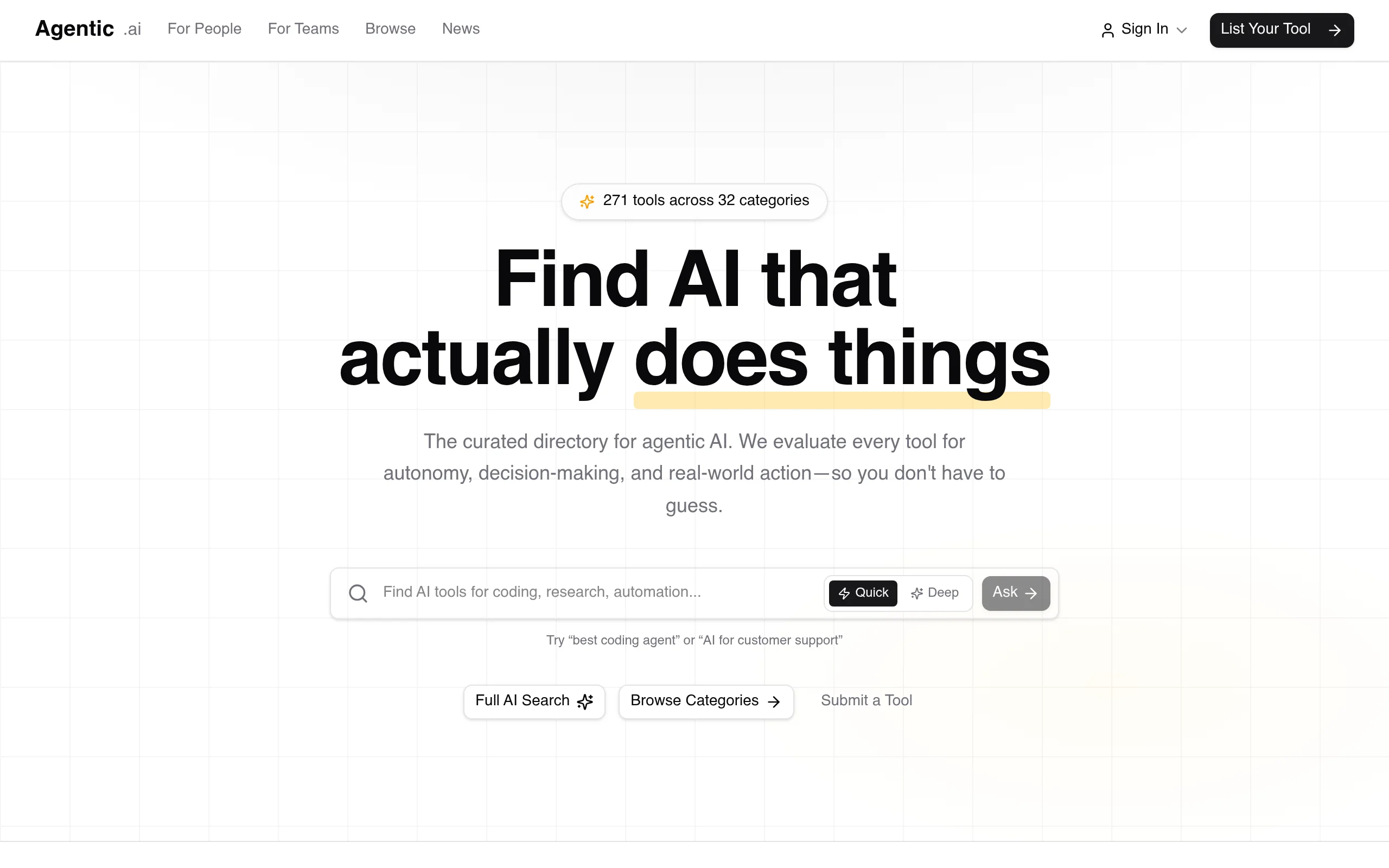
Introduction to Agentic.ai
In the rapidly evolving landscape of artificial intelligence, a new category has emerged that goes beyond simple chatbots and content generators: agentic AI. These are AI systems designed to operate autonomously, make decisions, and take real-world actions on behalf of users. However, finding the right agentic tool among hundreds of options can be overwhelming. This is where Agentic.ai comes in.
Agentic.ai is a curated directory specifically built for agentic AI products and services. Unlike general AI directories that list everything from image generators to text summarizers, Agentic.ai focuses exclusively on tools that demonstrate autonomy, decision-making capabilities, and the ability to execute real-world actions. Whether you are a developer looking for a coding agent, a marketer seeking an autonomous social media manager, or a business owner wanting to automate workflows, this platform helps you find AI that actually does things.
As of the latest update, Agentic.ai features 271 tools organized across 32 categories. The platform offers a full AI-powered search, browse-by-category functionality, a news section for updates on new launches and re-scored tools, and a trending tools section based on real user clicks. You can also submit your own agentic AI tool for listing. This tutorial will guide you through everything you need to know to use Agentic.ai effectively.
Getting Started with Agentic.ai
Accessing the Platform
To begin, navigate to https://agentic.ai/ using any modern web browser (Chrome, Firefox, Safari, or Edge). No account registration is required to browse the directory, search for tools, or read news updates. The platform is entirely free to use for discovery purposes.
Understanding the Homepage Layout
When you first land on Agentic.ai, you will see a clean, minimal interface designed for quick navigation. The homepage is divided into several key sections:
- Top Navigation Bar: Contains links to “Browse,” “News,” “Submit Tool,” and a search icon.
- Hero Section: A brief description of the platform with a prominent search bar.
- Trending Tools: A carousel or grid showing the most clicked tools based on user activity.
- Category Grid: An overview of the 32 available categories, each with a tool count.
- Recent News: Updates on new tool launches and re-scored tools.
Take a moment to scroll through the homepage. This will give you a sense of the type of tools available and how they are organized.
Key Features of Agentic.ai
1. Curated Directory of 271 Agentic AI Tools
The core of Agentic.ai is its hand-picked collection of agentic AI tools. Unlike automated scrapers, this directory is curated by humans who evaluate each tool based on three criteria:
- Autonomy: Does the tool operate independently without constant human input?
- Decision-Making: Can it analyze situations and make choices based on goals?
- Real-World Action: Does it produce tangible outcomes, not just text or images?
Each tool listing includes a title, a short description, a link to the tool’s website, and a “score” that reflects how agentic the tool is. Some listings also include tags like “New” or “Updated” to indicate recent changes.
2. AI-Powered Search
The search bar at the top of the page is not a simple keyword lookup. It uses AI-powered semantic search, which means you can type natural language queries like “automate my email outreach” or “AI that books meetings” and get relevant results. The AI understands the intent behind your words, not just exact matches.
3. Browse by 32 Categories
If you prefer to explore rather than search, the category system is your best friend. Categories range from broad areas like “Developer Tools” and “Marketing” to niche ones like “Legal”, “Healthcare”, and “Personal Assistants”. Each category page lists all tools within that category, sortable by name, score, or date added.
4. News Section
The News section keeps you updated on the agentic AI ecosystem. Here you will find:
- New launches: Recently added tools that have just entered the directory.
- Re-scored tools: Existing tools that have been re-evaluated and given a new autonomy score.
- Trending updates: Announcements about tools that are gaining popularity.
This section is invaluable for staying ahead of the curve in the fast-moving agentic AI space.
5. Trending Tools Section
Based on aggregate user click data, the Trending Tools section shows you what other users are currently interested in. This is a great way to discover tools that are gaining traction and have proven useful to the community.
6. Tool Submission Option
If you have built or represent an agentic AI tool that is not yet listed, you can submit it directly through the “Submit Tool” link in the navigation bar. The submission form asks for basic information such as the tool name, URL, category, and a brief description. The Agentic.ai team will then review it for inclusion.
How to Use Agentic.ai: A Step-by-Step Guide
Step 1: Searching for a Specific Tool
Let’s say you need an AI that can autonomously manage your calendar and schedule meetings. Here is how to find it:
- Click on the search bar at the top of the page.
- Type a natural language query: “AI that schedules meetings automatically”.
- Press Enter or click the search icon.
- Review the results. Each result shows the tool name, a brief description, and its agentic score.
- Click on any tool name to visit its dedicated listing page, which includes a full description, category tags, and a direct link to the tool’s website.
Pro tip: If your initial search does not yield perfect results, try rephrasing your query. For example, instead of “schedules meetings,” try “autonomous calendar assistant” or “meeting booking agent.”
Step 2: Browsing by Category
If you want to explore all tools in a specific domain, use the category system:
- On the homepage, scroll down to the Category Grid.
- Click on a category that interests you, such as “Customer Support”.
- You will be taken to a page listing all tools in that category. Each tool is displayed with its name, description, and score.
- Use the sort options (usually at the top of the list) to order by “Highest Score,” “Newest,” or “Most Popular.”
- Click on any tool to see its full details.
You can also navigate to the Browse page directly from the navigation bar. This shows all 271 tools across all categories, with filters to narrow down by category, score range, or date added.
Step 3: Checking the News Section
To stay updated on new tools and changes:
- Click on “News” in the top navigation bar.
- You will see a chronological list of updates. Each entry includes a title, date, and a short summary.
- Click on any news item to read the full announcement. This often includes details about why a tool was re-scored or what makes a new tool noteworthy.
The News section is updated regularly, so check back weekly to catch the latest developments.
Step 4: Using the Trending Tools Section
The Trending Tools section is visible on the homepage. To use it effectively:
- Look for the “Trending” label on the homepage.
- Browse through the listed tools. They are typically displayed in order of popularity based on recent clicks.
- If you see a tool that looks interesting, click on it to learn more.
This section is particularly useful if you have no specific tool in mind and want to see what the community finds valuable right now.
Step 5: Submitting a Tool (for Developers and Product Owners)
If you have an agentic AI tool you want to add to the directory:
- Click on “Submit Tool” in the navigation bar.
- Fill out the submission form with the following information:
- Tool Name: The official name of your product.
- URL: The link to your tool’s homepage.
- Category: Choose the most relevant category from the dropdown menu.
- Description: A brief explanation of what your tool does and how it demonstrates autonomy, decision-making, and real-world action.
- Optionally, you can provide an email address for follow-up questions.
- Click “Submit”. Your submission will be reviewed by the Agentic.ai team, and if approved, it will appear in the directory.
Note that submission does not guarantee immediate listing. The team evaluates each tool against the platform’s criteria to maintain quality.
Tips for Getting the Most Out of Agentic.ai
Tip 1: Use Natural Language for Better Search Results
The AI search engine is designed to understand conversational queries. Instead of typing “coding agent,” try “AI that writes and tests code for me.” The more context you provide, the more accurate the results will be. Experiment with different phrasings to uncover hidden gems.
Tip 2: Pay Attention to the Agentic Score
Each tool is scored based on how autonomous and action-oriented it is. A higher score means the tool requires less human intervention and can execute more complex tasks independently. If you need a fully autonomous solution, filter for tools with scores above 8 out of 10. If you prefer a hybrid tool that still requires some human oversight, look for scores in the 5-7 range.
Tip 3: Combine Browsing and Searching
Do not rely solely on search or categories. Use both methods together. For example, start by browsing the “Marketing” category, then use the search bar within that category to find tools specific to “email automation.” This two-step approach often yields the most relevant results.
Tip 4: Bookmark Tools You Like
Agentic.ai does not currently have a built-in favorites or wishlist feature. However, you can bookmark individual tool listing pages in your browser. Alternatively, keep a simple text file or spreadsheet of tools you are interested in, along with their scores and URLs. This will save you time when comparing options later.
Tip 5: Check the News Section Before Making a Decision
Before committing to a tool, check the News section to see if it has been recently re-scored or if a competitor has launched a new version. The agentic AI space changes rapidly, and a tool that was top-rated last month may have been surpassed by a newer, more autonomous alternative.
Tip 6: Use Trending Tools for Discovery, Not Final Decisions
The Trending section is great for inspiration, but remember that popularity does not always equal suitability. A trending tool might be popular because of marketing, not because it is the best fit for your specific use case. Always read the full description and visit the tool’s website before making a choice.
Tip 7: Submit Feedback If You Find an Error
Agentic.ai is a curated directory, but mistakes can happen. If you find a tool that is miscategorized, has a broken link, or is not truly agentic, look for a feedback option on the site (often an email link or a contact form). Reporting issues helps maintain the quality of the directory for everyone.
Tip 8: Revisit the Platform Regularly
With 271 tools and counting, the directory is constantly growing. New categories are added, existing tools are re-scored, and new launches appear in the News section. Set a reminder to check Agentic.ai every two weeks to stay updated on the latest agentic AI innovations.
Conclusion
Agentic.ai is more than just a list of AI tools—it is a curated gateway to the future of autonomous software. By focusing on tools that truly act, decide, and deliver results, it saves you from wading through thousands of generic AI products. Whether you are a developer, a business leader, or a curious enthusiast, this platform empowers you to find the right agentic AI for your needs.
Start by exploring the homepage, try a few searches, browse a category that interests you, and check the latest news. Over time, you will build a personal toolkit of agentic AIs that can automate your workflows, enhance your productivity, and give you a competitive edge. The age of AI that actually does things is here—and Agentic.ai is your map to navigate it.

Agentic.ai
Curated directory for agentic AI products that actually do things.