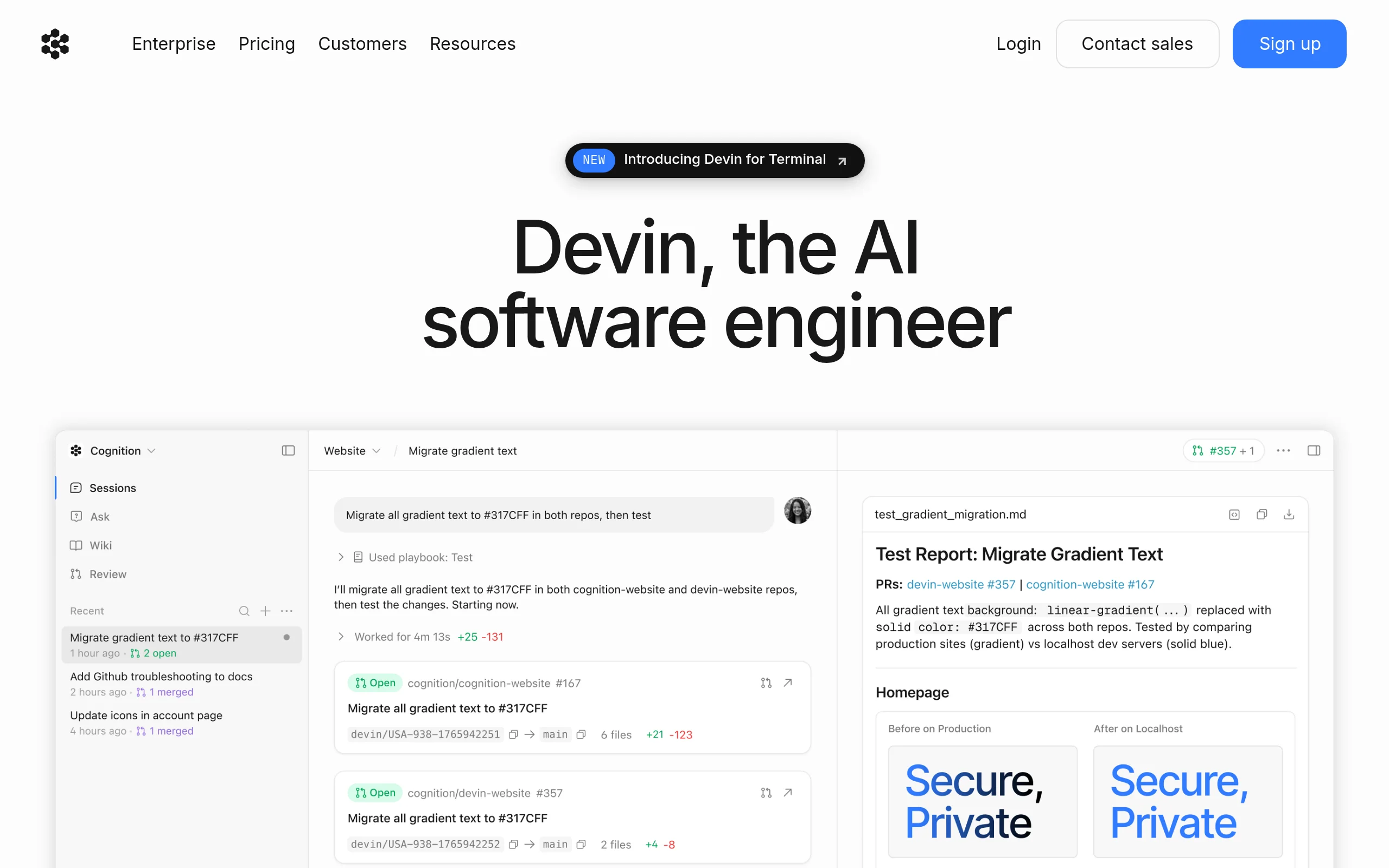
Introduction to Devin AI Software Engineer
In the rapidly evolving landscape of software development, artificial intelligence has introduced tools that promise to augment human productivity. Among the most groundbreaking of these is Devin AI Software Engineer, developed by Cognition Labs. Unlike conventional code assistants that suggest snippets or autocomplete lines, Devin represents a paradigm shift: it is an autonomous AI agent capable of handling entire software engineering tasks from start to finish. Whether you need to write a new feature, debug a stubborn error, refactor legacy code, or deploy an application to production, Devin can plan, execute, and verify the work with minimal human intervention.
Devin is built on advanced large language models, but it goes far beyond simple text generation. It has its own shell, code editor, and web browser. It can navigate complex codebases, understand project requirements in natural language, and execute multi-step workflows that involve writing code, running tests, committing changes to version control, and deploying applications. For developers, this means less time spent on routine coding tasks and more time for high-level architecture, design, and strategic thinking.
This tutorial is designed to be beginner-friendly and practical. By the end, you will understand what Devin can do, how to set it up, how to use its core features, and how to get the best results from this powerful AI software engineer.
Getting Started with Devin
Creating Your Account
To begin using Devin, navigate to https://devin.ai/. You will find a sign-up page where you can create an account. Currently, Devin is available through a waitlist or early access program, so you may need to request access. Once approved, you will receive login credentials and can access the Devin dashboard.
Understanding the Interface
The Devin interface is designed to be intuitive. After logging in, you will see a main workspace that resembles a collaborative coding environment. Key components include:
- Task Input Area: A text box where you describe your development task in natural language. This is where you tell Devin what you need.
- Session Log: A real-time feed showing Devin’s actions, including the commands it runs, the code it writes, and the decisions it makes.
- File Explorer: A panel that shows the project’s file structure, allowing you to see what Devin is modifying.
- Terminal Output: A live view of the command-line operations Devin executes, such as installing packages, running tests, or deploying.
- Collaboration Tools: Buttons to pause, resume, or provide feedback during a task.
Connecting to Your Repository
Devin integrates seamlessly with version control systems like GitHub, GitLab, and Bitbucket. To start working on an existing project, you will need to grant Devin access to your repository. This is typically done through OAuth authentication. Once connected, Devin can clone the repository, read the code, and push changes back after completing tasks. For new projects, you can simply describe what you want to build, and Devin will initialize a new repository for you.
Key Features of Devin AI Software Engineer
Autonomous Code Generation and Debugging
Devin’s core strength is its ability to generate production-quality code from natural language descriptions. You can ask it to “Create a REST API endpoint for user authentication” or “Fix the bug in the payment processing module that causes a timeout error.” Devin will analyze the existing codebase, understand the context, and write the necessary code. For debugging, it can run the application, identify errors, read error logs, and iteratively fix issues until tests pass.
Multi-Step Workflow Execution
Unlike simple code generators, Devin can execute complex, multi-step workflows. For example, you can ask it to “Set up a CI/CD pipeline with GitHub Actions, write unit tests for the new feature, deploy to AWS, and then update the documentation.” Devin will break this down into logical steps, execute each one, and adapt if something goes wrong. It can install dependencies, configure servers, and even make decisions about best practices.
Integration with Version Control Systems
Devin treats version control as a first-class citizen. It can create branches, commit code with meaningful messages, open pull requests, and even review its own changes. This means you can collaborate with Devin as you would with a human engineer: it will push its work to a branch, and you can review the code before merging. This integration ensures that all changes are tracked and reversible.
Automated Deployment and Testing
Devin can deploy applications to cloud platforms like AWS, Google Cloud, Azure, or Heroku. It understands deployment configurations, can write Dockerfiles, and set up serverless functions. Additionally, Devin writes and runs tests automatically. It will create unit tests, integration tests, and end-to-end tests to verify that the code works correctly. If a test fails, Devin will debug the issue and fix it before proceeding.
Natural Language Task Understanding
You do not need to be a technical expert to use Devin. You can describe your task in plain English, and Devin will interpret the requirements. For example, “I need a Python script that scrapes weather data from an API and saves it to a CSV file” will be understood without needing to specify libraries or API endpoints. Devin will intelligently choose the best tools and libraries for the job.
How to Use Devin: A Step-by-Step Guide
Step 1: Define Your Task Clearly
The quality of Devin’s output depends heavily on how well you describe the task. Start by writing a clear, concise description in the task input area. Include specific requirements, constraints, and any relevant context. For example:
“I have a Node.js Express application in my repository. Add a new route for user registration that accepts email and password, validates the input, hashes the password with bcrypt, and stores the user in a MongoDB database. Write unit tests for the registration logic.”
Be as specific as possible. If you have preferences for libraries, coding style, or architecture, mention them. Devin will use this information to guide its work.
Step 2: Launch the Task
Once you have written your task description, click the “Start” or “Execute” button. Devin will begin by analyzing the task. You will see the session log populate with Devin’s thoughts and actions. It might say things like “Analyzing project structure,” “Reading package.json,” or “Setting up development environment.” This transparency allows you to see what Devin is doing at every step.
Step 3: Monitor Progress and Provide Feedback
As Devin works, you can monitor its progress in real time. The session log shows every command it runs, every file it creates or modifies, and any errors it encounters. If you notice something off, you can pause the session and provide additional instructions. For example, you might say, “Use async/await instead of callbacks” or “Use PostgreSQL instead of MongoDB.” Devin will adjust its approach accordingly.
You can also use the “Interrupt” feature to stop Devin if it is going in the wrong direction. Then, clarify your requirements and restart. This interactive feedback loop is crucial for achieving the best results, especially for complex tasks.
Step 4: Review the Output
When Devin completes the task, it will provide a summary of what it did. You can review the changes in the file explorer or directly in your repository. Devin typically creates a new branch for its work, so you can inspect the code, run tests, and verify functionality before merging. Pay attention to the following:
- Code Quality: Check that the code follows your project’s style and conventions.
- Test Coverage: Ensure that Devin wrote adequate tests and that they pass.
- Documentation: See if Devin updated any relevant documentation or README files.
- Security: Verify that sensitive data (like API keys) is not hardcoded.
Step 5: Merge or Iterate
If you are satisfied with the work, you can merge the pull request that Devin created. If not, you can ask Devin to make additional changes. For example, “Refactor the user registration code to include email verification” or “Add input sanitization to prevent SQL injection.” Devin will iterate on its previous work until you are happy.
Practical Tips for Getting the Most Out of Devin
Be Specific and Provide Context
Devin performs best when it has clear instructions. Avoid vague descriptions like “Make the app better.” Instead, say “Improve the loading time of the homepage by optimizing database queries and implementing caching with Redis.” Provide context about your tech stack, existing architecture, and any constraints. The more information you give, the more accurate Devin’s output will be.
Use Incremental Tasks
For complex projects, break down the work into smaller, incremental tasks. Instead of asking Devin to “Build a complete e-commerce platform,” start with “Set up the product catalog database schema,” then “Create the product listing API,” then “Build the shopping cart functionality.” This approach allows you to review each step and ensures that Devin stays on track.
Leverage Devin’s Debugging Capabilities
One of Devin’s most powerful features is its ability to debug code. If you have a bug that you cannot fix, provide Devin with the error message, the steps to reproduce the issue, and the relevant code section. Devin will systematically investigate the problem, test hypotheses, and apply fixes. It can even run the application in its own environment to simulate the bug.
Review and Test Everything
While Devin is highly capable, it is not infallible. Always review the code it generates, especially for security-sensitive tasks like authentication, payment processing, or data handling. Run the tests yourself, and consider performing a code review as you would with a human developer. Devin is a tool to augment your work, not a replacement for your judgment.
Use Devin for Repetitive and Tedious Tasks
Devin excels at tasks that are time-consuming and repetitive. Use it for writing boilerplate code, setting up configuration files, migrating databases, refactoring legacy code, or writing documentation. This frees you up to focus on creative problem-solving and architecture decisions that require human insight.
Keep Your Repository Clean
Devin will create branches and commits as it works. To keep your repository history clean, ask Devin to squash commits or rebase before merging. You can also instruct Devin to follow your team’s branching strategy, such as using feature branches or Git Flow.
Provide Feedback to Improve Results
If Devin produces something that is not quite right, give specific feedback. For example, “The code works, but it is not optimized for mobile devices. Please add responsive design using CSS media queries.” Devin learns from this feedback and will adjust its future behavior. Over time, you will develop a more effective collaboration.
Understand Devin’s Limitations
Devin is not a replacement for human creativity, domain expertise, or ethical judgment. It cannot understand nuanced business requirements, make strategic trade-offs, or invent novel solutions to unprecedented problems. Use Devin for execution, not for vision. Always maintain oversight, especially for tasks that involve user data, financial transactions, or compliance regulations.
Conclusion
Devin AI Software Engineer represents a significant leap forward in AI-assisted development. By autonomously handling complex coding tasks, debugging, testing, and deployment, it allows developers to focus on what truly matters: designing robust systems, solving challenging problems, and delivering value to users. This tutorial has walked you through the basics of getting started, the key features, a practical step-by-step usage guide, and tips for maximizing your productivity with Devin.
As you begin using Devin, remember that it is a collaboration tool. The best results come from clear communication, incremental task breakdown, and thorough review. Embrace Devin as a tireless junior engineer who can execute your instructions with speed and precision, but always keep your hand on the wheel. With practice, you will find that Devin becomes an indispensable part of your development workflow, accelerating your projects and freeing your mind for higher-level thinking.
Start your journey today at https://devin.ai/ and experience the future of software engineering.

Devin AI Software Engineer
Devin is an AI software engineer that autonomously builds and deploys code.