Introduction
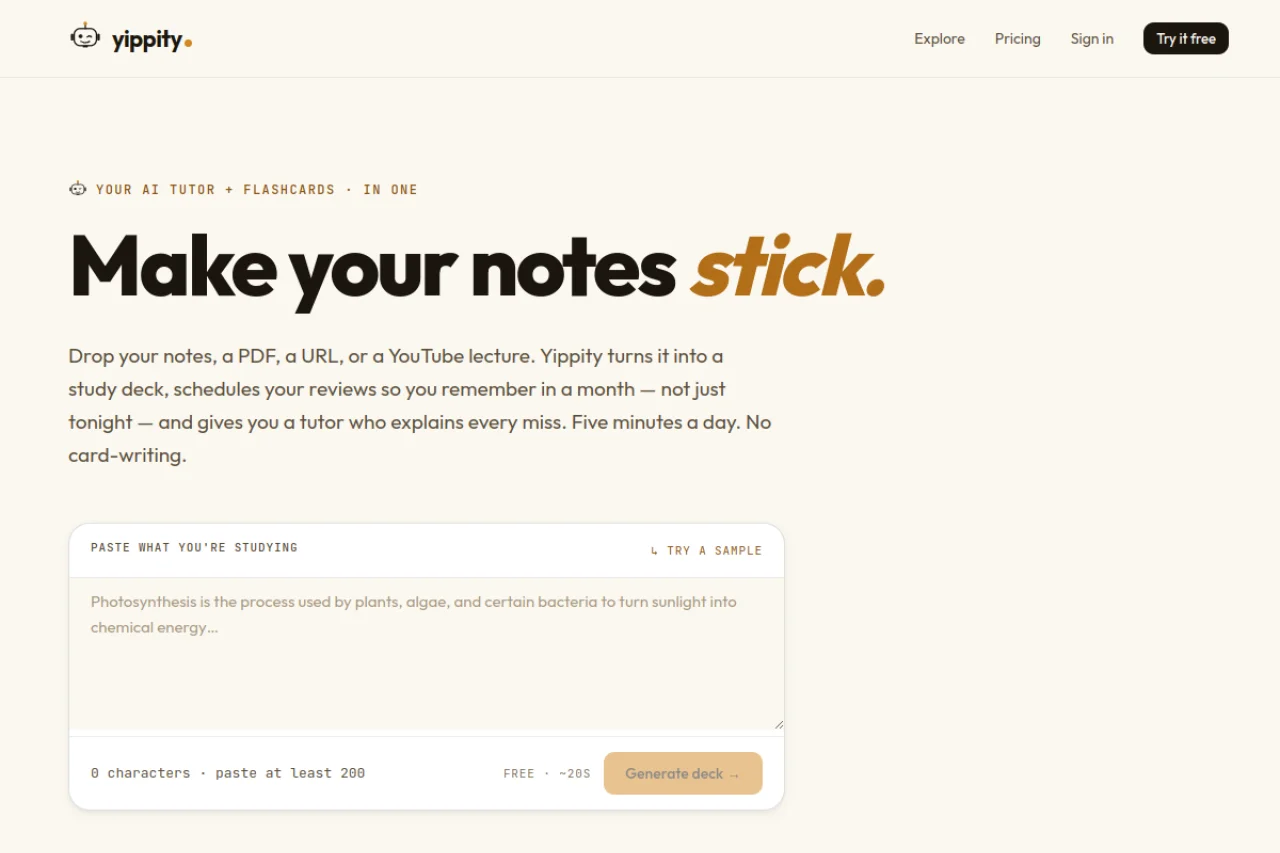
In the age of information overload, students and lifelong learners face a common challenge: how to absorb, retain, and recall vast amounts of knowledge efficiently. Traditional study methods like re-reading notes or highlighting textbooks often lead to passive learning and poor long-term retention. Enter Yippity, an AI-powered study tool that revolutionizes the way you create and review flashcards. Available at https://yippity.io/, Yippity transforms your raw study materials—whether they are handwritten notes, PDF textbooks, web articles, or YouTube lectures—into structured flashcards in approximately 20 seconds. By leveraging spaced repetition, an evidence-based learning technique, Yippity schedules your reviews at optimal intervals to maximize memory retention. Additionally, it features an intelligent AI tutor named Yip that explains every wrong answer with a citation directly from your source material. This tutorial will guide you through every aspect of Yippity, from initial setup to advanced study strategies, ensuring you get the most out of this powerful tool.
Getting Started
Creating Your Account
To begin using Yippity, navigate to https://yippity.io/ in your web browser. Click the “Sign Up” button located in the top-right corner of the homepage. You can register using your email address or by linking your Google account for faster access. After confirming your email, you will be redirected to your personal dashboard. The interface is clean and intuitive, designed to minimize distractions and keep your focus on learning.
Dashboard Overview
Your dashboard is the command center for all your study activities. On the left sidebar, you will find options to “Create New Deck”, “My Decks”, and “Study History”. The main area displays your existing flashcard decks, each showing the deck name, the number of cards, and your last study date. A green progress bar indicates your mastery level for each deck. At the top, a search bar allows you to quickly find specific decks or cards. Take a moment to explore these elements—they will become your daily companions.
Navigating the Interface
Yippity’s interface is designed for speed. Every action, from generating cards to reviewing them, requires minimal clicks. The “Settings” icon (a gear symbol) in the top bar lets you adjust your study preferences, including the number of cards per session and the spacing intervals for reviews. You can also toggle dark mode here if you prefer studying at night. The “Help” icon provides quick access to FAQs and video tutorials if you ever feel stuck.
Key Features
1. Flashcard Generation from Multiple Sources
Yippity accepts four types of input: plain text notes, PDF files, URLs (web articles or blog posts), and YouTube video links. Simply paste your content or upload a file, and Yippity’s AI analyzes the material to extract key concepts, definitions, and questions. The entire process takes about 20 seconds, saving you hours of manual card creation. For YouTube videos, Yippity transcribes the audio and then generates cards based on the transcript, making it ideal for lecture recordings or educational channels.
2. Multiple Card Formats
One size does not fit all when it comes to learning. Yippity offers six distinct card formats to match your study style:
- Multiple Choice: A question with four possible answers. Only one is correct.
- True/False: A statement you must verify as true or false.
- Open-Ended: A question requiring a typed response, perfect for testing recall.
- Fill-in-the-Blank: A sentence with a missing word or phrase you must complete.
- Two-Sided Flashcards: Traditional front-and-back cards, ideal for vocabulary or definitions.
- Match-Pairs: A set of terms and definitions you must drag and connect correctly.
You can mix different formats within a single deck, keeping your study sessions varied and engaging.
3. Spaced Repetition Scheduling
Yippity automatically schedules your reviews using a spaced repetition algorithm. After you answer a card, you rate your confidence on a simple scale (e.g., “Easy,” “Medium,” “Hard”). Cards you find difficult appear more frequently, while easy ones are pushed further into the future. This method ensures you spend time on material you are about to forget, dramatically improving long-term retention compared to cramming.
4. AI Tutor (Yip) with Source Citations
When you answer a question incorrectly, Yippity’s AI tutor, Yip, steps in. Yip does not just tell you the right answer—it explains why your answer was wrong and provides a citation from your original source material (e.g., “See page 3 of your PDF” or “Refer to 2:15 in the YouTube video”). This contextual feedback turns every mistake into a learning opportunity, helping you understand the material deeply rather than just memorizing facts.
5. Deck Customization and Organization
You can edit any generated card before studying. Change the wording, add hints, or delete cards that are irrelevant. Decks can be organized into folders by subject (e.g., “Biology,” “History,” “Spanish Vocabulary”). You can also share decks with classmates via a unique link, enabling collaborative study.
How to Use Yippity
Step 1: Generating Your First Deck
From your dashboard, click “Create New Deck”. Give your deck a descriptive name, such as “Chapter 5: Cellular Respiration.” Next, choose your input source:
- From Notes: Type or paste your notes into the text box. Aim for 200-500 words for best results.
- From PDF: Click the upload button and select a PDF file from your computer. Yippity supports files up to 50 MB.
- From URL: Paste the link to a web article or blog post. Ensure the page is publicly accessible.
- From YouTube: Paste the video URL. Videos up to 2 hours are supported.
After selecting your source, click “Generate Flashcards”. The AI will process your content, and within 20 seconds, a preview of your cards will appear. You can scroll through them, edit any card by clicking the pencil icon, or delete cards that seem redundant. When satisfied, click “Save Deck”.
Step 2: Choosing Card Formats
Before generating, you can specify which card formats you want. Look for the “Card Format” dropdown menu. Check the boxes for the formats you prefer. For example, if you are learning vocabulary, select “Two-Sided Flashcards” and “Fill-in-the-Blank.” If you are preparing for a multiple-choice exam, select that option. Yippity will then generate cards in those formats only. You can also change the format of individual cards after generation by editing them.
Step 3: Starting a Study Session
From your dashboard, click on a deck to open it. You will see two buttons: “Study Now” and “Review”. Click “Study Now” to begin a session with all cards. Click “Review” to see only the cards scheduled for today by spaced repetition. During the session, cards appear one at a time. Depending on the format, you will either click an answer, type a response, or drag items to match them.
Step 4: Using the AI Tutor (Yip)
After answering a card, Yippity immediately shows whether you were correct or incorrect. If you answered incorrectly, a pop-up appears with Yip’s explanation. For example, if you miss a multiple-choice question about the mitochondria, Yip might say: “The correct answer is ‘powerhouse of the cell.’ Your answer, ‘control center,’ refers to the nucleus. Source: Your PDF, page 5, second paragraph.” Read this explanation carefully—it is tailored to your specific material. You can also click “Ask Yip for More Details” to get a deeper explanation or a simpler version of the concept.
Step 5: Managing Spaced Repetition
After each answer, rate your confidence by clicking one of the buttons: “Again” (I forgot), “Hard” (I struggled), “Good” (I knew it but with some effort), or “Easy” (I knew it instantly). Based on your rating, Yippity adjusts the card’s next review date. Cards rated “Again” reappear in a few minutes; “Easy” cards may not appear for weeks. Over time, this schedule adapts to your memory, ensuring you review cards just before you are likely to forget them.
Step 6: Reviewing Your Progress
Click on “Study History” in the sidebar to see detailed statistics. You can view your accuracy rate per deck, the number of cards mastered, and your study streak. This data helps you identify weak areas. For instance, if your accuracy on open-ended cards is low, you might want to focus more on that format. You can also reset a deck’s progress if you want to start over from scratch.
Tips for Maximizing Yippity
1. Feed It Quality Material
Yippity’s output is only as good as its input. For best results, provide clear, well-structured notes or PDFs. If using a YouTube video, choose one with a clean transcript (e.g., educational channels, lecture recordings). Avoid videos with heavy background noise or rapid, unstructured speech. For URLs, select articles that are factual and organized with headings—these produce more coherent flashcards.
2. Mix Card Formats in a Single Deck
Do not limit yourself to one format. A deck that combines multiple-choice, open-ended, and match-pairs cards forces your brain to retrieve information in different ways, strengthening neural pathways. For example, after studying a biology chapter, use multiple-choice for definitions, open-ended for processes, and match-pairs for diagrams and labels. Yippity allows this mixing seamlessly.
3. Use the AI Tutor Actively
Do not skip Yip’s explanations. Even if you get a card right, click on “Show Explanation” to reinforce your understanding. Yip often adds context that was not in the original card, such as connections to other concepts in your material. This turns every review into a mini-lesson.
4. Stick to Daily Reviews
Spaced repetition works best when you are consistent. Aim for at least 15–20 minutes of review each day. Yippity’s algorithm prioritizes cards that are about to be forgotten, so even short daily sessions yield better results than long, infrequent cram sessions. Use the “Review” button to see only the cards due today—this keeps your workload manageable.
5. Customize Before Studying
After generating a deck, spend 5 minutes editing. Delete cards that are too vague or factually incorrect. Add your own hints or mnemonics to the “hint” field of two-sided cards. For example, for a card about “Photosynthesis,” you might add the hint: “Think about the word ‘photo’ (light).” This personalization makes recall easier.
6. Leverage the Share Feature for Group Study
If you are studying with classmates, create a master deck and share it via the “Share” button. Each person can study independently, but you can also compare accuracy statistics. Discussing why certain cards are difficult can deepen everyone’s understanding. Just be sure to set deck permissions to “View Only” to prevent accidental edits.
7. Use YouTube for Complex Topics
When studying subjects like physics, anatomy, or programming, YouTube lectures are often more effective than text. Paste a video link into Yippity, and it will generate cards from the transcript. The AI tutor can then cite the exact timestamp where the concept was explained, allowing you to rewatch that section for visual reinforcement.
8. Periodically Review Your Deck Library
Over time, you will accumulate many decks. Archive old ones you no longer need (click the three dots on a deck and select “Archive”). For active decks, check the “Mastery” percentage. If a deck shows 90% mastery, you can reduce your review frequency to once a week. This keeps your study load focused on material you have not yet mastered.
9. Practice with Timed Sessions
If you are preparing for an exam, use Yippity’s timer feature (found in the study session settings). Set a timer for 25 minutes (a Pomodoro session) and try to answer as many cards as possible. This builds speed and recall under pressure, mimicking exam conditions.
10. Combine with Other Study Methods
Yippity is powerful, but it works best as part of a broader study routine. After reviewing flashcards, try teaching the concepts to a friend or writing a summary without notes. Use Yippity’s match-pairs format to test yourself on diagrams or timelines. The combination of active recall (flashcards) and elaboration (teaching or writing) is proven to boost retention.
Conclusion
Yippity is more than just a flashcard generator—it is a complete study ecosystem that adapts to your learning style and schedule. By automating the tedious process of card creation and using AI to provide personalized feedback, it frees you to focus on what truly matters: understanding and remembering. Whether you are a high school student tackling biology, a university student reviewing law cases, or a professional learning a new skill, Yippity can dramatically reduce your study time while improving your results. Start with a single deck today, experiment with the different formats, and let Yip guide you through your mistakes. Within a week, you will notice a significant improvement in how quickly you recall information. Visit https://yippity.io/ to begin your smarter study journey.

Yippity — AI Flashcards from Notes, PDFs & YouTube
AI study companion that turns notes, PDFs, and YouTube videos into flashcards with a built-in AI tutor.