Introduction to Qwen Chat
In the rapidly evolving world of artificial intelligence, conversational assistants have become indispensable tools for productivity, creativity, and problem-solving. Qwen Chat, developed by Alibaba, stands out as a powerful AI-powered conversational assistant designed to help users with a wide range of tasks through natural language interactions. Whether you need help writing an email, debugging code, brainstorming ideas, or simply answering a complex question, Qwen Chat leverages advanced language models to deliver accurate, context-aware, and human-like responses.
Unlike many other AI tools that focus solely on text generation, Qwen Chat is deeply integrated into the Alibaba ecosystem, offering seamless connectivity with Alibaba Cloud services, e-commerce platforms, and business tools. This makes it particularly valuable for professionals, developers, and entrepreneurs who rely on Alibaba’s infrastructure. However, even if you are not an Alibaba user, Qwen Chat functions as a standalone, versatile assistant that can handle everyday tasks with ease.
This tutorial is designed for beginners. You do not need any technical background to get started. By the end of this guide, you will understand how to access Qwen Chat, use its core features, and apply practical tips to get the most out of this AI tool. Let’s dive in.
Getting Started with Qwen Chat
Accessing the Platform
To begin using Qwen Chat, you need to visit the official website at https://chat.qwen.ai/. This is a web-based application, meaning you can use it directly in your browser without downloading any software. It works on desktop computers, laptops, tablets, and smartphones.
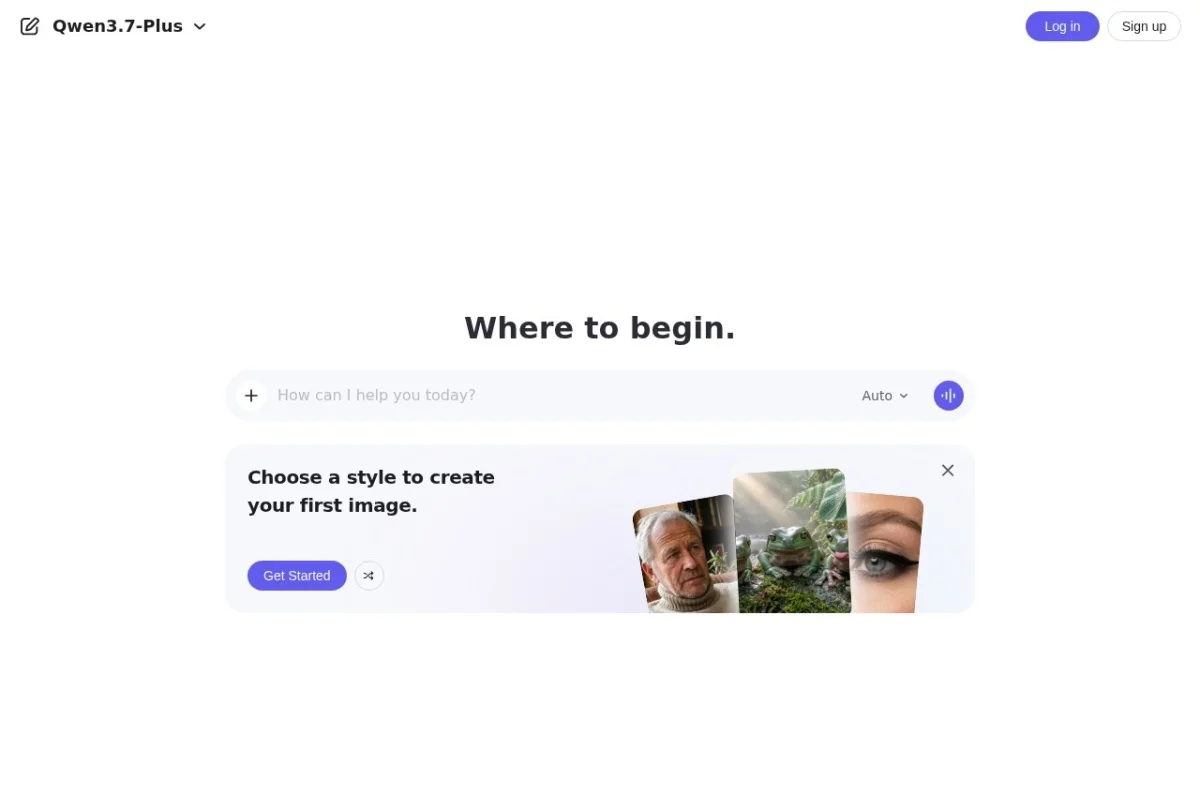
When you first load the page, you will see a clean, minimalist interface. At the center of the screen, there is a text input box where you can type your messages. Above the input box, you may see a welcome message or sample prompts to help you get started. If you are a new user, you might be asked to sign in or create an account. Qwen Chat typically supports login via Alibaba ID, email, or phone number. Follow the on-screen instructions to register or log in.
Understanding the Interface
Once logged in, the interface is straightforward:
- Chat Window: The main area where your conversation with Qwen Chat appears. Your messages are displayed on the right, and Qwen’s responses appear on the left.
- Input Box: Located at the bottom of the screen. Type your question or command here and press Enter or click the send button (usually an arrow or a paper plane icon).
- Settings or Menu Icon: Often found in the top-left or top-right corner. This may allow you to adjust language preferences, view conversation history, or access additional features like file uploads.
- New Chat Button: A button to start a fresh conversation. This is useful when you want to change topics without confusing the AI with previous context.
Starting Your First Conversation
To start, simply type a greeting or a question in the input box. For example, type “Hello, Qwen!” and press Enter. The AI will respond with a friendly greeting and an offer to help. From there, you can ask anything. Try asking a simple question like “What is the capital of France?” or “Explain quantum computing in simple terms.” Qwen Chat will generate a detailed, accurate response.
Remember that Qwen Chat maintains context within a single conversation. This means you can ask follow-up questions without repeating yourself. For instance, after asking about the capital of France, you can say “Tell me more about its history” and Qwen will understand you are still referring to France.
Key Features of Qwen Chat
Natural Language Conversation
The core strength of Qwen Chat is its ability to engage in fluid, human-like conversations. It understands nuances, idioms, and complex sentence structures. You can speak to it as you would to a knowledgeable friend. It can handle multiple turns of dialogue, remember details you mentioned earlier, and adjust its tone based on your requests. For example, you can say “Explain this like I’m a child” or “Give me a professional summary,” and it will adapt accordingly.
Task Assistance and Q&A
Qwen Chat excels at answering questions across a vast range of topics. From science and history to current events and personal advice, the AI draws on its training data to provide informative answers. It can also assist with practical tasks such as:
- Planning: “Help me create a 7-day itinerary for a trip to Japan.”
- Decision Making: “What are the pros and cons of buying an electric car?”
- Research: “Summarize the key findings of the 2023 IPCC climate report.”
- Problem Solving: “My computer won’t turn on. What should I check first?”
Writing and Coding Support
One of the most popular uses of Qwen Chat is content creation and programming assistance. For writers, it can generate blog posts, emails, social media captions, poetry, or even entire stories. You can provide a topic, a desired tone, and a word count, and Qwen will produce a draft. For example, “Write a friendly email to a client about a delayed shipment.”
For developers, Qwen Chat is a capable coding companion. It can write code snippets in languages like Python, JavaScript, Java, C++, and more. It can debug existing code, explain how a function works, or suggest optimizations. For instance, you can paste a piece of buggy code and say “Find the error and fix it.” It will not only correct the code but also explain why the error occurred.
Integration with Alibaba Ecosystem
If you use Alibaba services, Qwen Chat offers unique advantages. It can connect with Alibaba Cloud for technical support, help manage e-commerce operations on Taobao or Tmall, or assist with DingTalk (Alibaba’s workplace communication tool). For example, you can ask “How do I set up a virtual private cloud on Alibaba Cloud?” or “Show me the sales report for last month on my store.” This integration makes Qwen Chat a powerful tool for businesses already embedded in the Alibaba ecosystem.
How to Use Qwen Chat: Step-by-Step Examples
Example 1: Basic Q&A
Suppose you want to know the difference between machine learning and deep learning. Simply type:
User: “What is the difference between machine learning and deep learning?”
Qwen Chat: Will respond with a clear explanation, possibly including definitions, examples, and a comparison table in text form. You can then ask follow-up questions like “Can you give me a real-world example of each?”
Example 2: Writing Assistance
Imagine you need to write a cover letter for a job application. Type:
User: “Help me write a cover letter for a data analyst position. I have 3 years of experience in Python and SQL.”
Qwen Chat will generate a professional cover letter draft. You can then request changes: “Make it more concise” or “Add a sentence about my experience with Tableau.”
Example 3: Coding Help
You are stuck on a Python problem. You want to write a function that reverses a string. Type:
User: “Write a Python function to reverse a string without using built-in reverse methods.”
Qwen Chat will provide the code, often with comments explaining each step. You can then copy the code, test it, and ask for modifications if needed.
Example 4: Using Context
Qwen Chat remembers the conversation. For instance:
User: “I am planning a birthday party for a 10-year-old. Suggest some themes.”
Qwen: Suggests themes like space, superheroes, or unicorns.
User: “I like the space theme. What decorations do I need?”
Qwen: Provides a list of decorations, remembering the context of the space theme.
Tips for Getting the Most Out of Qwen Chat
Be Specific and Clear
The quality of Qwen Chat’s responses depends heavily on how you phrase your requests. Instead of saying “Write something about dogs,” say “Write a 300-word blog post about the benefits of adopting a rescue dog, aimed at first-time pet owners.” Specific instructions yield more relevant and useful outputs.
Use Follow-Up Questions
Do not hesitate to ask for clarification or expansion. If the first answer is too technical, say “Can you simplify that?” or “Explain it like I’m a beginner.” If you need more detail, say “Go deeper into the second point.” Qwen Chat is designed to iterate and refine its responses.
Leverage the System Prompt
Some versions of Qwen Chat allow you to set a system prompt or persona. For example, you can start a conversation with “Act as a career coach” or “You are a professional chef.” This will tailor all subsequent responses to that role. Experiment with different personas to get advice from different perspectives.
Break Down Complex Tasks
If you have a large project, such as writing a research paper or building a web application, break it into smaller steps. First, ask for an outline. Then, ask for each section one by one. For coding, ask for the architecture first, then individual functions. This approach prevents the AI from getting overwhelmed and ensures each part is high quality.
Review and Edit the Output
Always treat Qwen Chat’s responses as a draft. The AI is highly capable, but it can make mistakes or produce generic content. Read through the output, verify facts, and adjust the tone or style to match your needs. Use the AI as a starting point, not a final product.
Use the “New Chat” Feature for Different Topics
If you switch topics completely, it is better to start a new conversation. For example, if you were discussing cooking recipes and then want to ask about quantum physics, the previous context might confuse the AI. Click the “New Chat” button to reset the context and get fresh, focused responses.
Explore Alibaba-Specific Features
If you are an Alibaba user, take advantage of the ecosystem integration. Ask Qwen Chat about Alibaba Cloud documentation, e-commerce best practices, or DingTalk automation. This can save you hours of searching through manuals or forums.
Experiment with Different Languages
Qwen Chat supports multiple languages, including English, Chinese, Spanish, and more. If you are bilingual, try asking questions in one language and requesting answers in another. This is useful for language learning or translation tasks.
Conclusion
Qwen Chat is a versatile, powerful AI assistant that can significantly boost your productivity, creativity, and problem-solving abilities. Whether you are a student, a professional, a developer, or a business owner, this tool offers practical assistance for a wide array of tasks. By understanding its features, practicing clear communication, and applying the tips outlined in this tutorial, you will be able to harness the full potential of Qwen Chat.
Start your journey today by visiting https://chat.qwen.ai/ and asking your first question. The more you use it, the more you will discover its capabilities. Happy chatting!
